Guest requests
24H
At least 24 hours’ notice
The booking may be changed. With less than 24 hours’ notice, the booking is locked in and rescheduling or cancellation is generally not permitted.
View guest proceduresTXSNOW · INSTRUCTOR SOP
Instructor standard operating procedures Version 2.4
Check the notice period, confirm the arrangements and record changes in the session group chat.

Guest requests
The booking may be changed. With less than 24 hours’ notice, the booking is locked in and rescheduling or cancellation is generally not permitted.
View guest proceduresChanges requested by instructors
The booking may be changed. Notify the guest and TXSNOW at least 48 hours in advance. For shorter notice or a no-show, follow Section 09.
View the four tiersInstructor booking changes follow SOP version 2.4. All refund matters are governed by the TXSNOW Refund Policy.
Find the situation, then refer to the full procedure.
| Situation | Policy | Instructor action |
|---|---|---|
| Guest requests a change at least 24H in advance | PolicyRescheduling or cancellation is permitted | Instructor actionConfirm the new time with the guest. If no date is set, tag TXSNOW Support to mark the session as pending and retain the unused session hours. See Section 03 |
| Guest requests a change less than 24H in advance | PolicyThe booking is locked in; rescheduling or cancellation is not permitted | Instructor actionSee Section 04. For an instructor’s voluntary exception, see Section 05. See Section 04 |
| Guest explicitly cancels within 24H | PolicyWithout an instructor-approved exception, the session counts as used | Instructor actionConfirm in the group chat and tag TXSNOW Support for the record. You do not need to travel to the resort or continue waiting there. See Section 06 |
| Guest is absent or unreachable at the scheduled start | PolicyDo not assume that the session is cancelled | Instructor actionFollow the TXSNOW Punctuality & Lateness: Instructor SOP. Remain ready to teach and wait at the meeting point or a nearby lounge. See Section 06 |
| The resort officially closes | PolicyReschedule at no charge | Instructor actionPost the resort’s official notice in the session group chat and tag TXSNOW Support to handle the change. See Section 08 |
| Instructor needs to change a booking or is a no-show | PolicyApply the tiers under the 48H rule | Instructor actionNotify the guest and TXSNOW immediately. See Section 09 for the required actions and session compensation. See Section 09 |
10 procedures · Select a heading to expand or collapse
Once the session group chat is created, TXSNOW Support sends the link to the TXSNOW Pre-Session Guide and reminds the guest to read it.
I’m unavailable at that time the day after tomorrow. I’ll help you find an instructor of the same level or ask TXSNOW to coordinate.
Exception for a designated instructor: if the guest has specifically booked a particular instructor, that instructor and the guest should agree on another time that works for both.
If a guest asks TXSNOW to change a confirmed session, TXSNOW Support explains that rescheduling or cancellation is not permitted with less than 24 hours’ notice.
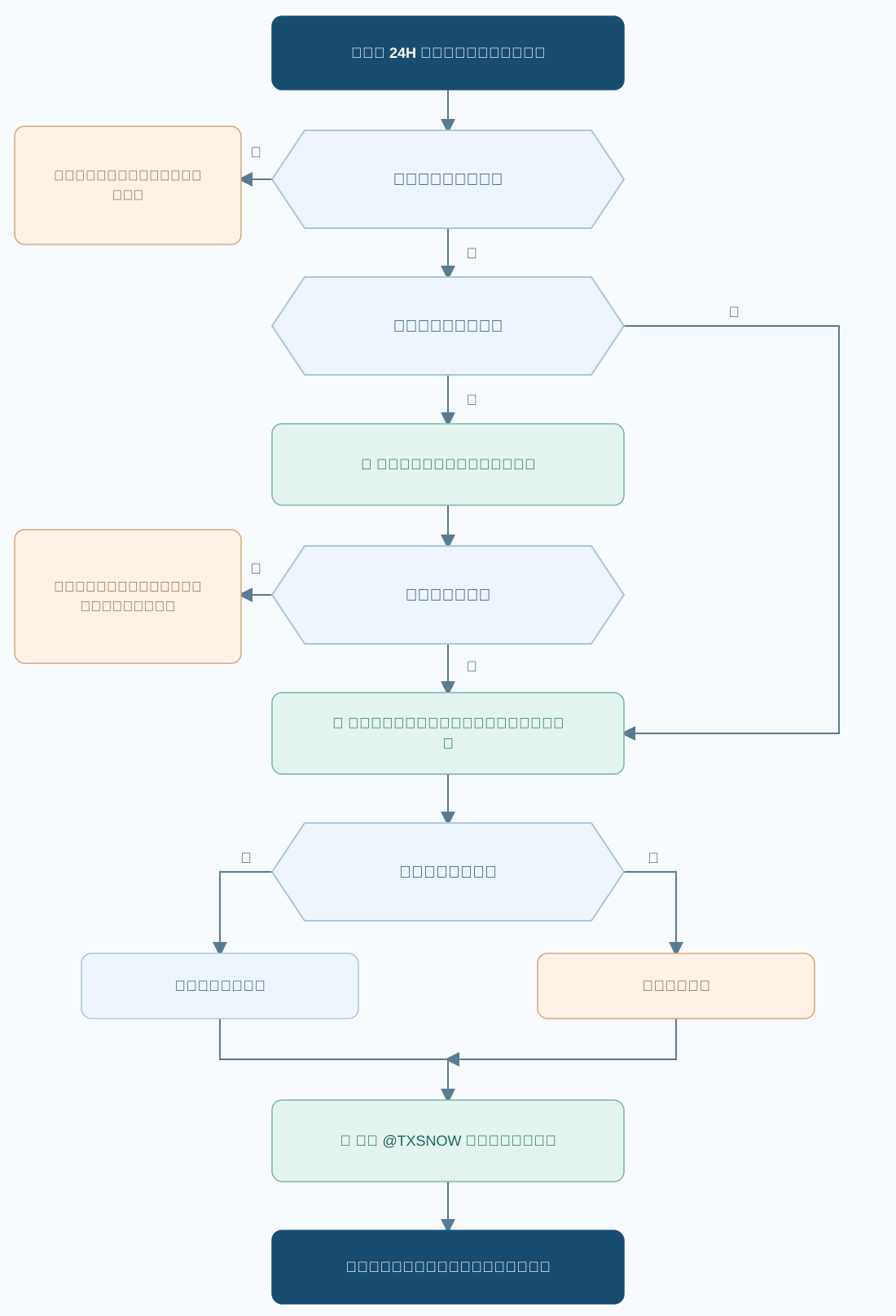
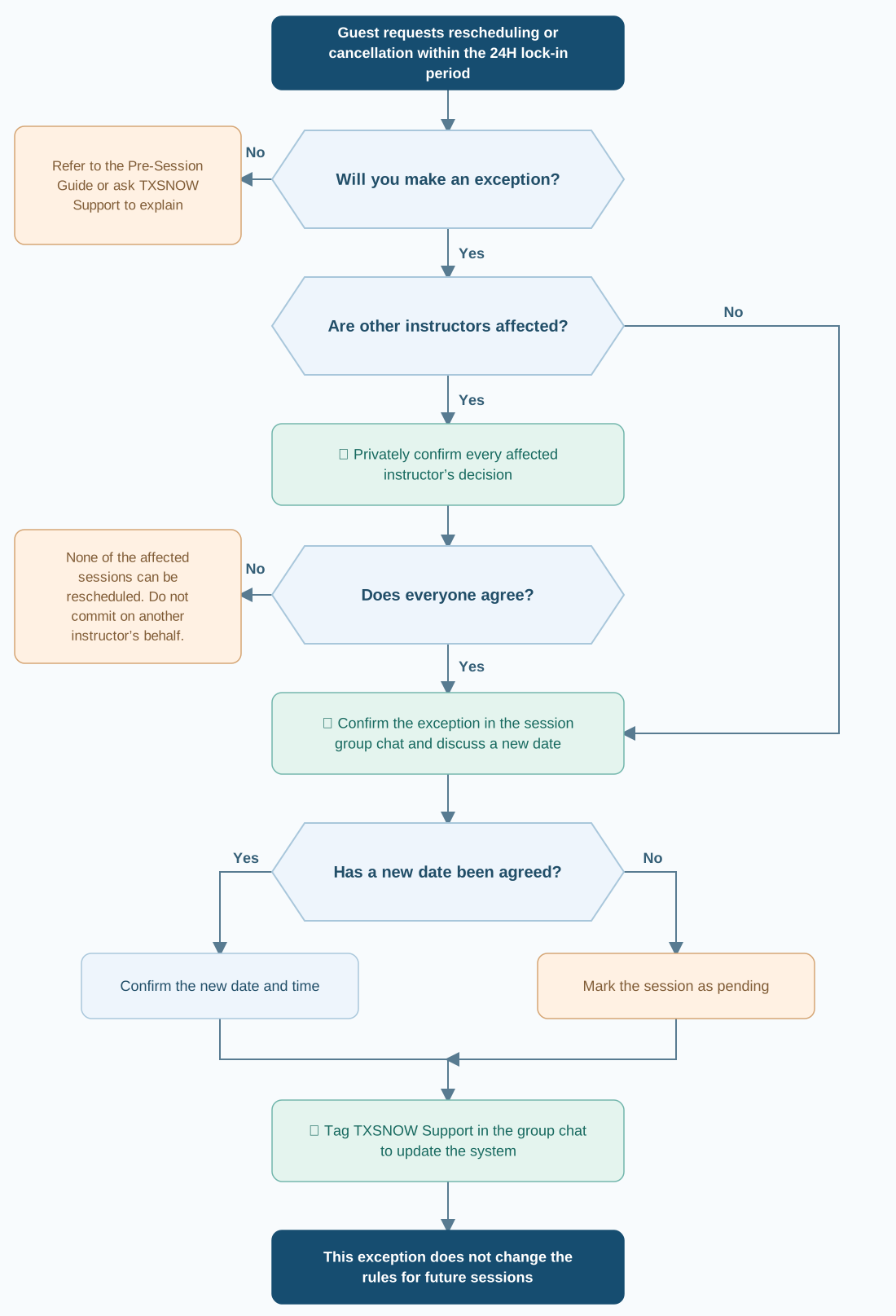
When a guest asks to reschedule or cancel, you must clearly confirm in the session group chat whether you agree to the change, regardless of whether you choose to make an exception.
If multiple instructors are involved, privately confirm that every instructor whose sessions are affected agrees before replying to the guest. If even one does not agree, none of the affected sessions can be rescheduled. Do not make commitments on another instructor’s behalf.
Explain in the group chat that you can make a one-time exception and agree on a new date with the guest. If no new date has been decided, mark the session as pending.
Tag TXSNOW Support in the group chat to update the system. This individual exception does not change the rescheduling and cancellation rules for future sessions.
Example: a guest sees heavy rain in the next day’s forecast and asks in the group chat to reschedule, with less than 24H before the session. The instructor also expects heavy rain and wants to reschedule. The instructor may reply:
Under TXSNOW’s policy, sessions generally cannot be changed within 24H. Given your circumstances, I can adjust my schedule to make a one-time exception. Please let me know which day you would like to move the session to so we can confirm a new time. This arrangement does not mean that future sessions can be changed at short notice.
If exceptional circumstances prevent you from delivering the session, notify the guest and TXSNOW immediately, then follow the applicable tier:
| Notice / situation | Instructor action | Session arrangements & compensation |
|---|---|---|
| Tier 1≥ 48HAt least 48 hours in advance | Instructor action
| Session arrangements & compensation
|
| Tier 224H < notice < 48HMore than 24 but less than 48 hours in advance | Instructor action
| Session arrangements & compensation
|
| Tier 3≤ 24H · Before the start24 hours or less in advance, before the session starts | Instructor action
| Session arrangements & compensation
|
| Tier 4No-showLate by the full session duration, or absent for the entire original time slot | Instructor action
| Session arrangements & compensation
|
The replacement must be an instructor under contract with TXSNOW who meets the original session requirements and can teach at the original time and resort.
The undelivered original session is still owed. Additional sessions provided as compensation are additional. The original instructor must provide the same session type and duration.
State your estimated arrival time and how many extra minutes you will provide as compensation in the group chat.
The instructor and guest have agreed to reschedule the session as a one-time exception.
APPENDIX 01
Start with the guest’s request. Complete each check before committing to a change.
TXSNOW · INSTRUCTOR SOP
教练执行流程(SOP) 版本 2.4
明确时间界线,确认变更安排,在上课群内同步记录。
客户申请变更
可以变更预约。不足 24 小时进入锁定期,原则上不接受改期或取消。
查看客户规则教练自身变更
可以变更预约;应至少提前 48 小时通知客户和 TXSNOW。不足 48 小时或发生爽约,按第 09 项处理。
查看四档处理标准教练变更依据 2.4 版本 SOP 规范课程预约变更及教练执行流程。退款事项统一适用《TXSNOW 退款政策》。
先找到对应情形,再查看完整执行要求。
| 情形 | 处理原则 | 教练执行方法 |
|---|---|---|
| 客户提前至少 24H 想改期 | 处理原则可以改期或取消预约 | 教练执行方法与客户确认新时间;未定日期则 @客服转为待定,保留未使用课时。 查看第 03 项 |
| 客户提前不足 24H 想改期 | 处理原则进入锁定期,不可改期或取消预约 | 教练执行方法见第 04 项;教练自愿使用改期特权的情况见第 05 项。 查看第 04 项 |
| 客户在 24H 内明确取消 | 处理原则未使用改期特权时,课程视为已使用 | 教练执行方法群内确认并 @客服留档,无需前往雪场或在雪场继续等待。 查看第 06 项 |
| 客户开课时间未到或失联 | 处理原则不能自行认定课程已取消 | 教练执行方法按《TXSNOW 准时与迟到:教练执行 SOP》保持可授课状态,在集合点或附近休息室等待。 查看第 06 项 |
| 雪场官方关闭 | 处理原则免费改期 | 教练执行方法上课群内发布雪场公告,@客服统一处理。 查看第 08 项 |
| 教练需要变更或爽约 | 处理原则按“48H 原则”分档处理 | 教练执行方法立即通知客户和 TXSNOW;执行要求与课程补偿见第 09 项。 查看第 09 项 |
10 项执行规范 · 点击标题可展开或收起
建群后,客服发送《TXSNOW 课前须知》链接,并提醒客户阅读。
后天这个时段我没有档期,我帮您联系同级教练,或请 TXSNOW 协调安排。
固定教练例外:学员已指定固定教练的,由原教练与学员协商双方可行的新时间。
在课程确定后,客户如果咨询 TXSNOW 能否改期,客服统一回复为:24H 内不可改期或取消。
客户表达改期或取消意愿后,无论教练是否使用改期特权,均须在上课群内明确回复是否同意调整。
当课程涉及多位教练时,务必先私下确认所有受影响课程的教练均同意,方可回复客户。如果有个别教练不同意,则全部课程均无法改期;教练不得代替其他教练作出承诺。
教练须在上课群说明,自己可以破例同意改期,并与客户协商更改日期;暂未确定新日期的,转为待定。
教练在群内 @TXSNOW 客服同步系统。本次个案安排不改变后续课程适用的改期与取消规则。
示例:客人看到第二天会下大雨,在群内留言是否可以改期,此时距离上课不足 24H。教练也认为会下大雨,也想改期,可以在群里回复:
按 TXSNOW 政策,24H 内课程原则上不能更改。不过鉴于您的特殊情况,我这次的时间可以破例配合。所以请跟我说一下,想改到哪天,我们确认一下新的上课时间。本次安排不代表后续课程均可临时调整。
如遇特殊情况,教练自身无法履约授课,应立即通知客户和 TXSNOW,并按以下时间分档处理:
| 变更情形 | 教练执行方法 | 课程安排与补偿 |
|---|---|---|
| 第 1 档≥ 48H提前至少 48 小时 | 教练执行方法
| 课程安排与补偿
|
| 第 2 档24H < 提前时间 < 48H超过 24 小时,但不足 48 小时 | 教练执行方法
| 课程安排与补偿
|
| 第 3 档≤ 24H · 尚未开课提前 24 小时及以内,但尚未开课 | 教练执行方法
| 课程安排与补偿
|
| 第 4 档爽约迟到达到整节课时长,或整个原定时段未履约 | 教练执行方法
| 课程安排与补偿
|
须为符合原课程要求、能在原时间和原雪场接课的 TXSNOW 签约教练。
未完成的原课仍须履行,免费补偿课另计,由原教练提供同类型课程和课时。
在群内说明预计到达时间,以及会补偿的分钟数。
教练已和学员协商好,可以破例配合改期。
APPENDIX 01
从客户提出申请开始,逐项确认后再承诺变更。
TXSNOW · INSTRUCTOR SOP
教練執行流程(SOP) 版本 2.4
明確時間界線,確認變更安排,在上課羣內同步記錄。
客戶申請變更
可以變更預約。不足 24 小時進入鎖定期,原則上不接受改期或取消。
查看客戶規則教練自身變更
可以變更預約;應至少提前 48 小時通知客戶和 TXSNOW。不足 48 小時或發生爽約,按第 09 項處理。
查看四檔處理標準教練變更依據 2.4 版本 SOP 規範課程預約變更及教練執行流程。退款事項統一適用《TXSNOW 退款政策》。
先找到對應情形,再查看完整執行要求。
| 情形 | 處理原則 | 教練執行方法 |
|---|---|---|
| 客戶提前至少 24H 想改期 | 處理原則可以改期或取消預約 | 教練執行方法與客戶確認新時間;未定日期則 @客服轉爲待定,保留未使用課時。 查看第 03 項 |
| 客戶提前不足 24H 想改期 | 處理原則進入鎖定期,不可改期或取消預約 | 教練執行方法見第 04 項;教練自願使用改期特權的情況見第 05 項。 查看第 04 項 |
| 客戶在 24H 內明確取消 | 處理原則未使用改期特權時,課程視爲已使用 | 教練執行方法羣內確認並 @客服留檔,無需前往雪場或在雪場繼續等待。 查看第 06 項 |
| 客戶開課時間未到或失聯 | 處理原則不能自行認定課程已取消 | 教練執行方法按《TXSNOW 準時與遲到:教練執行 SOP》保持可授課狀態,在集合點或附近休息室等待。 查看第 06 項 |
| 雪場官方關閉 | 處理原則免費改期 | 教練執行方法上課羣內發佈雪場公告,@客服統一處理。 查看第 08 項 |
| 教練需要變更或爽約 | 處理原則按“48H 原則”分檔處理 | 教練執行方法立即通知客戶和 TXSNOW;執行要求與課程補償見第 09 項。 查看第 09 項 |
10 項執行規範 · 點擊標題可展開或收起
建羣后,客服發送《TXSNOW 課前須知》鏈接,並提醒客戶閱讀。
後天這個時段我沒有檔期,我幫您聯繫同級教練,或請 TXSNOW 協調安排。
固定教練例外:學員已指定固定教練的,由原教練與學員協商雙方可行的新時間。
在課程確定後,客戶如果諮詢 TXSNOW 能否改期,客服統一回復爲:24H 內不可改期或取消。
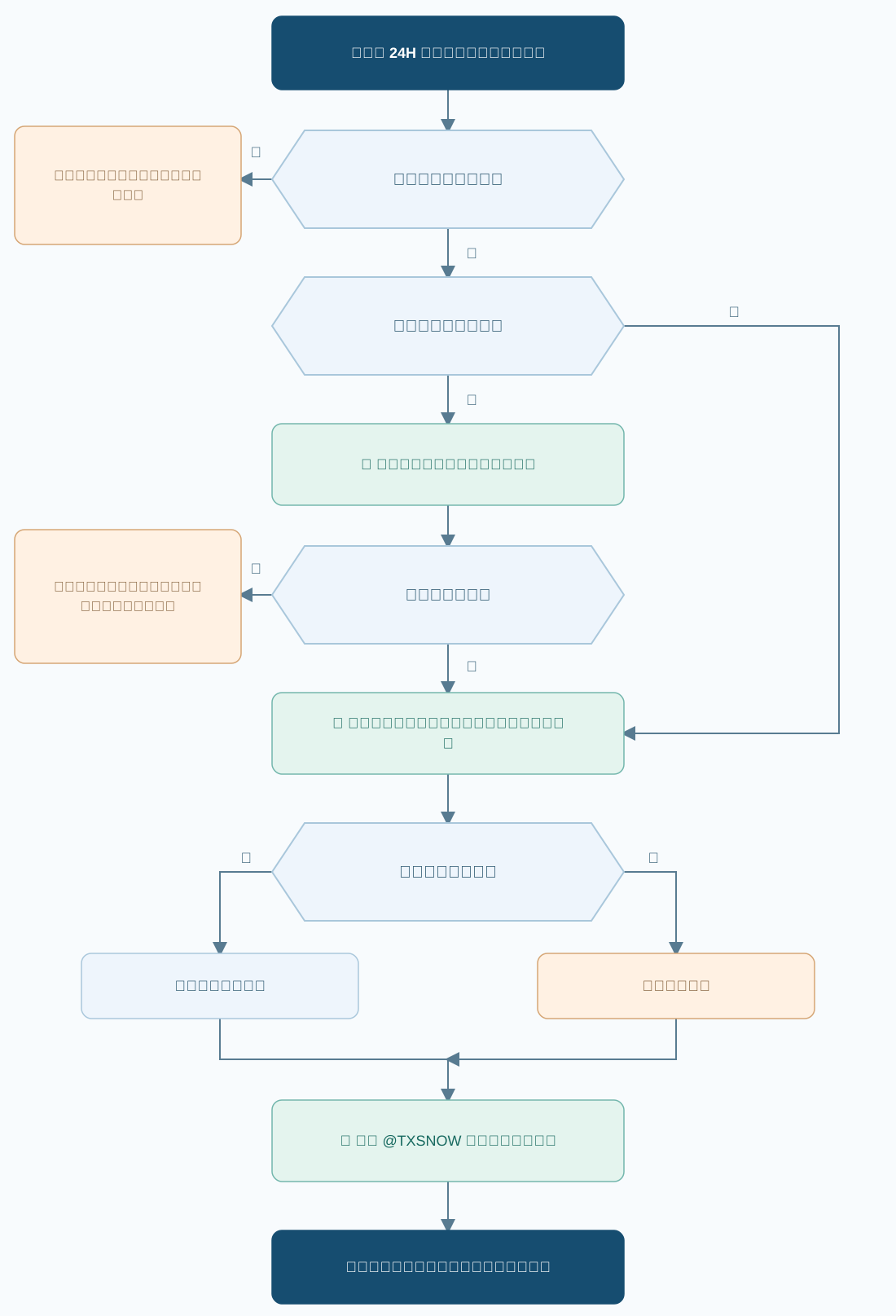
客戶表達改期或取消意願後,無論教練是否使用改期特權,均須在上課羣內明確回覆是否同意調整。
當課程涉及多位教練時,務必先私下確認所有受影響課程的教練均同意,方可回覆客戶。如果有個別教練不同意,則全部課程均無法改期;教練不得代替其他教練作出承諾。
教練須在上課羣說明,自己可以破例同意改期,並與客戶協商更改日期;暫未確定新日期的,轉爲待定。
教練在羣內 @TXSNOW 客服同步系統。本次個案安排不改變後續課程適用的改期與取消規則。
示例:客人看到第二天會下大雨,在羣內留言是否可以改期,此時距離上課不足 24H。教練也認爲會下大雨,也想改期,可以在羣裏回覆:
按 TXSNOW 政策,24H 內課程原則上不能更改。不過鑑於您的特殊情況,我這次的時間可以破例配合。所以請跟我說一下,想改到哪天,我們確認一下新的上課時間。本次安排不代表後續課程均可臨時調整。
如遇特殊情況,教練自身無法履約授課,應立即通知客戶和 TXSNOW,並按以下時間分檔處理:
| 變更情形 | 教練執行方法 | 課程安排與補償 |
|---|---|---|
| 第 1 檔≥ 48H提前至少 48 小時 | 教練執行方法
| 課程安排與補償
|
| 第 2 檔24H < 提前時間 < 48H超過 24 小時,但不足 48 小時 | 教練執行方法
| 課程安排與補償
|
| 第 3 檔≤ 24H · 尚未開課提前 24 小時及以內,但尚未開課 | 教練執行方法
| 課程安排與補償
|
| 第 4 檔爽約遲到達到整節課時長,或整個原定時段未履約 | 教練執行方法
| 課程安排與補償
|
須爲符合原課程要求、能在原時間和原雪場接課的 TXSNOW 簽約教練。
未完成的原課仍須履行,免費補償課另計,由原教練提供同類型課程和課時。
在羣內說明預計到達時間,以及會補償的分鐘數。
教練已和學員協商好,可以破例配合改期。
APPENDIX 01
從客戶提出申請開始,逐項確認後再承諾變更。